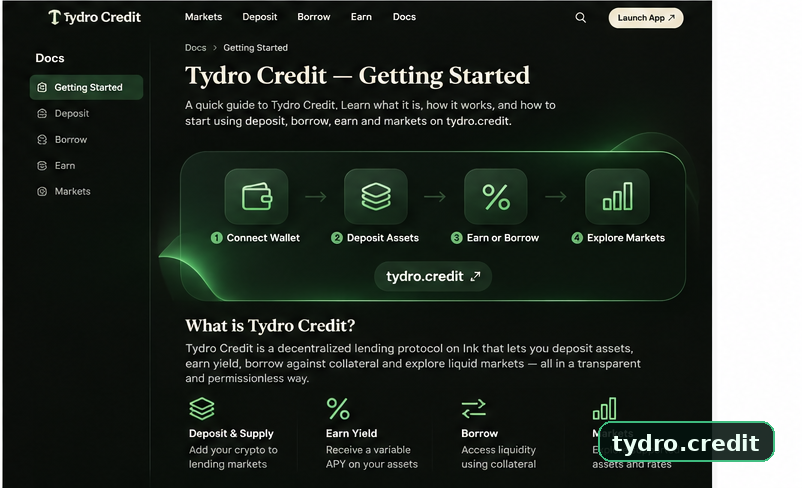
A practical introduction to Tydro Credit: understand the interface, explore lending markets and learn the basic steps before you supply assets or borrow.
About this guide
Tydro Credit is a decentralized lending interface on the Ink network. It brings key lending actions together so users can review markets, supply supported crypto assets and, where available, borrow against supplied collateral. Tydro is described as powered by Aave V3. Always use the live interface and current documentation to confirm available assets and market conditions.
What you need before using Tydro
Before interacting with a DeFi lending protocol, prepare a compatible self-custody wallet, access to the Ink network, and the asset you intend to use. Keep enough of the network’s native gas token for transaction fees. Never share your seed phrase or private keys with a website, support agent or anyone else.
Step 1: Connect your wallet
Open the Tydro Credit website and choose the wallet connection option. Select your wallet provider and approve the connection in the wallet itself. A connection lets the app read your public wallet address; it does not by itself authorize a token transfer. Review every wallet prompt carefully.
Step 2: Check the network and markets
Confirm that your wallet is connected to Ink. Open Markets and inspect the currently supported assets, supply APY, borrow rates and any market-specific parameters displayed by the interface. These values can change, so do not rely on old screenshots or third-party estimates.
Step 3: Choose what you want to do
Deposit or Supply is used to add supported assets to a lending market. Borrow is used to take a supported asset loan against eligible collateral, where the market allows it. Earn information may help you understand variable supply yield and any officially displayed incentives.
Step 4: Review and confirm transactions
Check the selected asset, amount, network, estimated fees and transaction details before approving. Some actions may require a separate token approval transaction followed by the supply or borrow transaction. Confirm only transactions you understand.
Manage your position
After a transaction, review your supplied balance, accrued yield if displayed, borrowed balance and collateral status in the interface. Monitor changes in market rates and collateral requirements. Repay borrowing and manage collateral before your position approaches any displayed risk threshold.
Frequently Asked Questions
What is Tydro Credit?
Tydro Credit is a DeFi lending interface on Ink for exploring lending markets, supplying supported assets and borrowing where supported. The live app and official documentation are the source of truth for current features.
Do I need a wallet to use Tydro?
Yes. DeFi transactions are signed from a compatible self-custody wallet. Keep your recovery phrase private and approve transactions only after reviewing them.
Does connecting my wallet deposit funds?
No. Connecting a wallet normally establishes a session with your public address. A deposit or other on-chain action requires a separate transaction approval.
Are supply APY and rewards guaranteed?
No. Supply APY is variable and can change with market conditions. Any incentives are subject to their official terms and availability.
Related Tydro guides
Continue with another guide to understand the full lending workflow.
DeFi lending involves risk, including smart-contract, market, liquidity, oracle and network risks. Rates and supported assets may change. No APY, incentive, airdrop or return is guaranteed. This guide is educational and is not financial advice. Always verify transaction details and current protocol terms in the live Tydro interface.